
OKFDE FIELD NOTES #005|Four steps from manual reconciliation to bounded autonomy
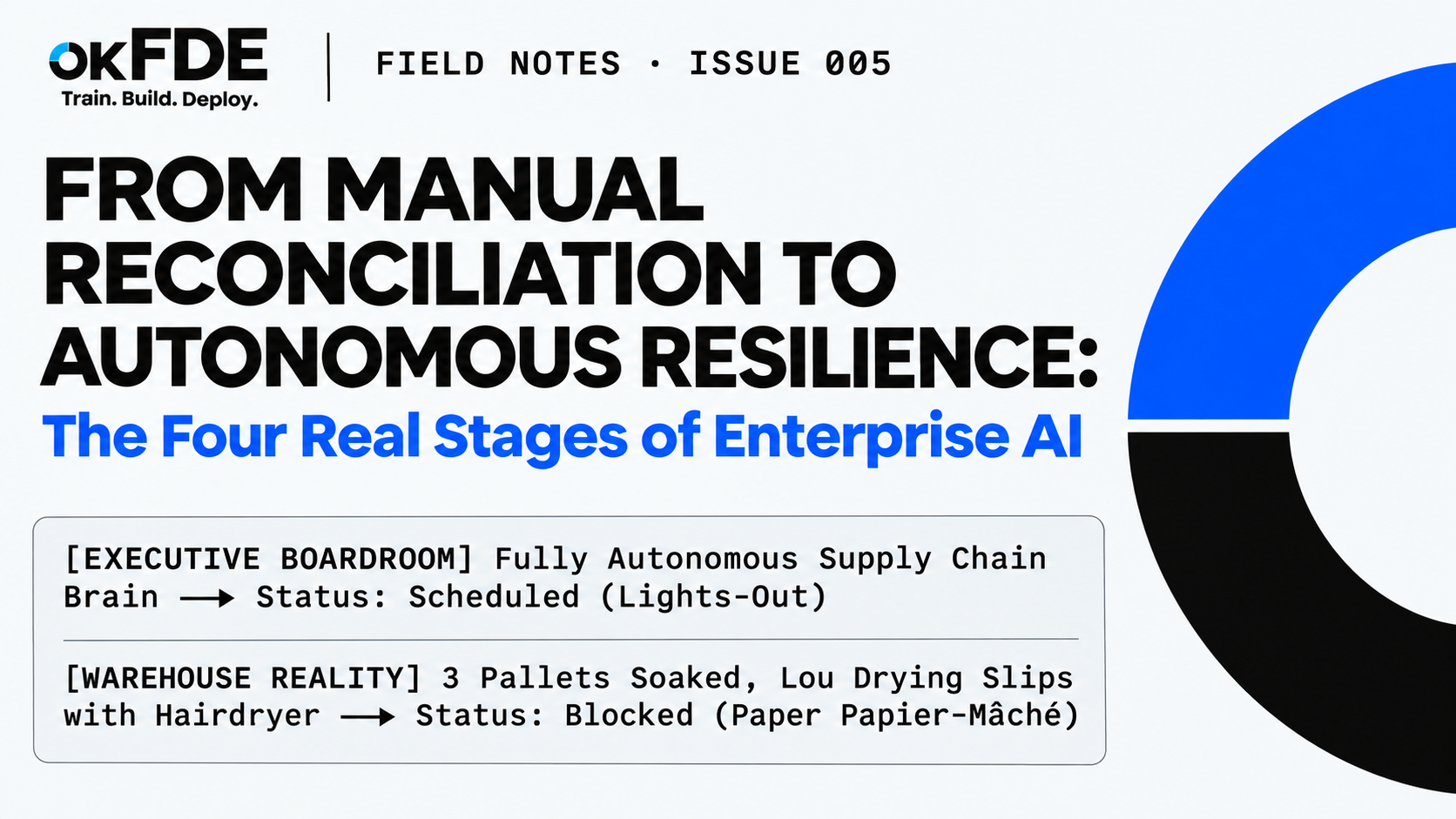
The order approval pilot works. Alex wants to automate the supply chain. The warehouse still needs a hairdryer to recover last week’s records.
KEY TAKEAWAY
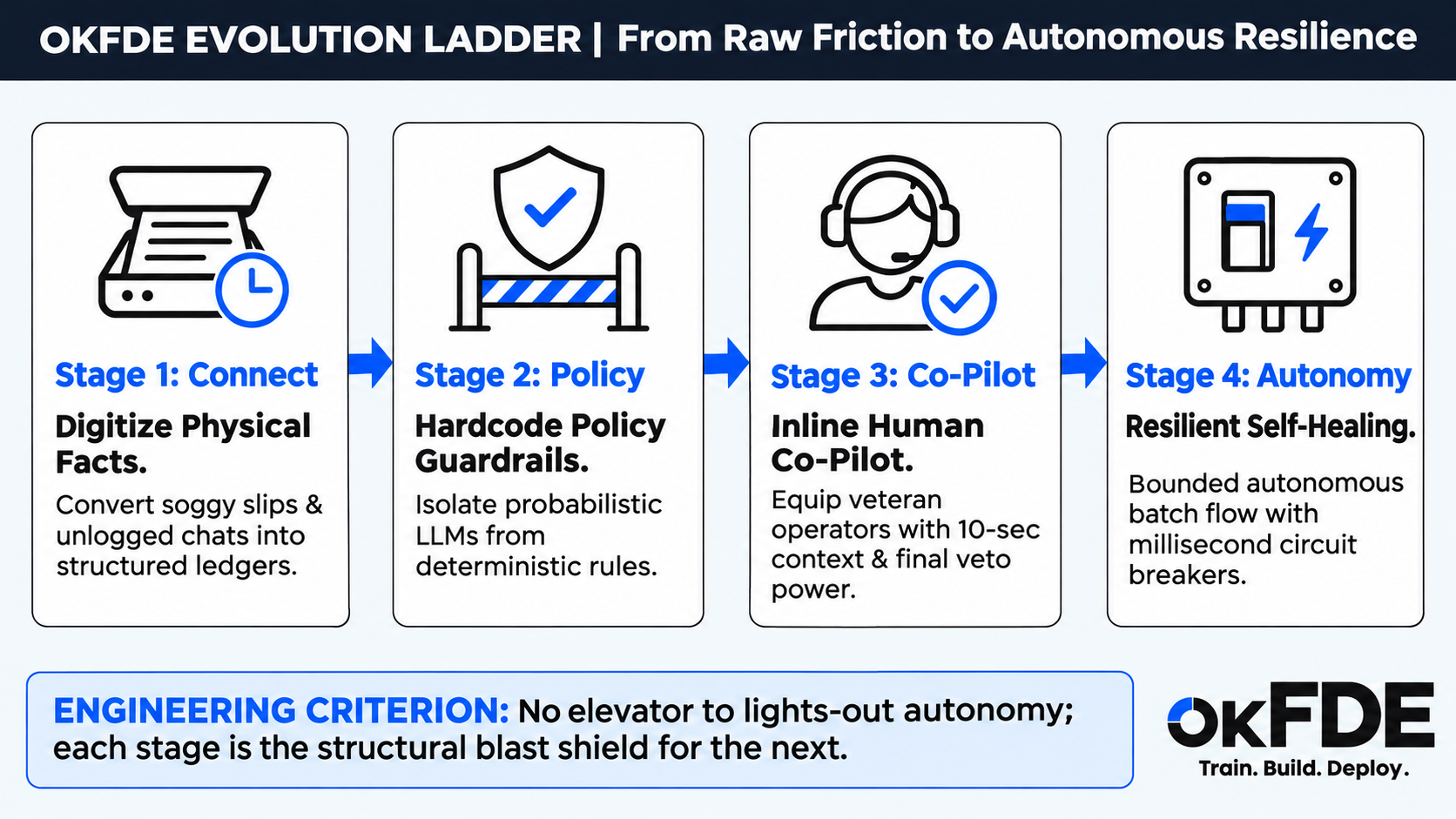
A working pilot gives a team somewhere to start. Expanding it means capturing the records people depend on, defining who can approve each action, helping operators handle exceptions, and testing how automation stops when something goes wrong. These four steps provide a practical framework for deciding what a workflow is ready to do.
This article uses a fictional supply-chain engagement. The characters, events, and performance figures illustrate engineering choices; they are not measured customer results.
The whiteboard and the warehouse
Leo is packing his power strip when Alex, the VP of Operations, asks him to come into the meeting room.
The order approval tool is working. Clara can review recommendations inside the ERP, and she no longer has to copy order numbers between windows.
Alex has plans for the next phase.
On the whiteboard, he has written “FULLY AUTONOMOUS SUPPLY CHAIN BRAIN” inside a large circle. Arrows connect procurement, warehousing, logistics, and finance.
“Could we connect the whole process next month?” he asks. “Supplier negotiations, inventory checks, payments. Let the system handle the routine work overnight.”
Before Leo answers, Clara appears at the door.
“A pipe burst in the warehouse,” she says. “Last week’s receiving slips got soaked. Lou is drying them one at a time with a hairdryer. He also needs approval for a new rack and two barcode scanners.”
Alex looks back at the whiteboard.
The diagram has an automated payment process. It has no place for wet paper.
The next phase starts in the warehouse.
01 / Capture the records people use
Lou, the warehouse supervisor, has a pile of receiving slips beside his desk. A calendar holds the rest of the information.
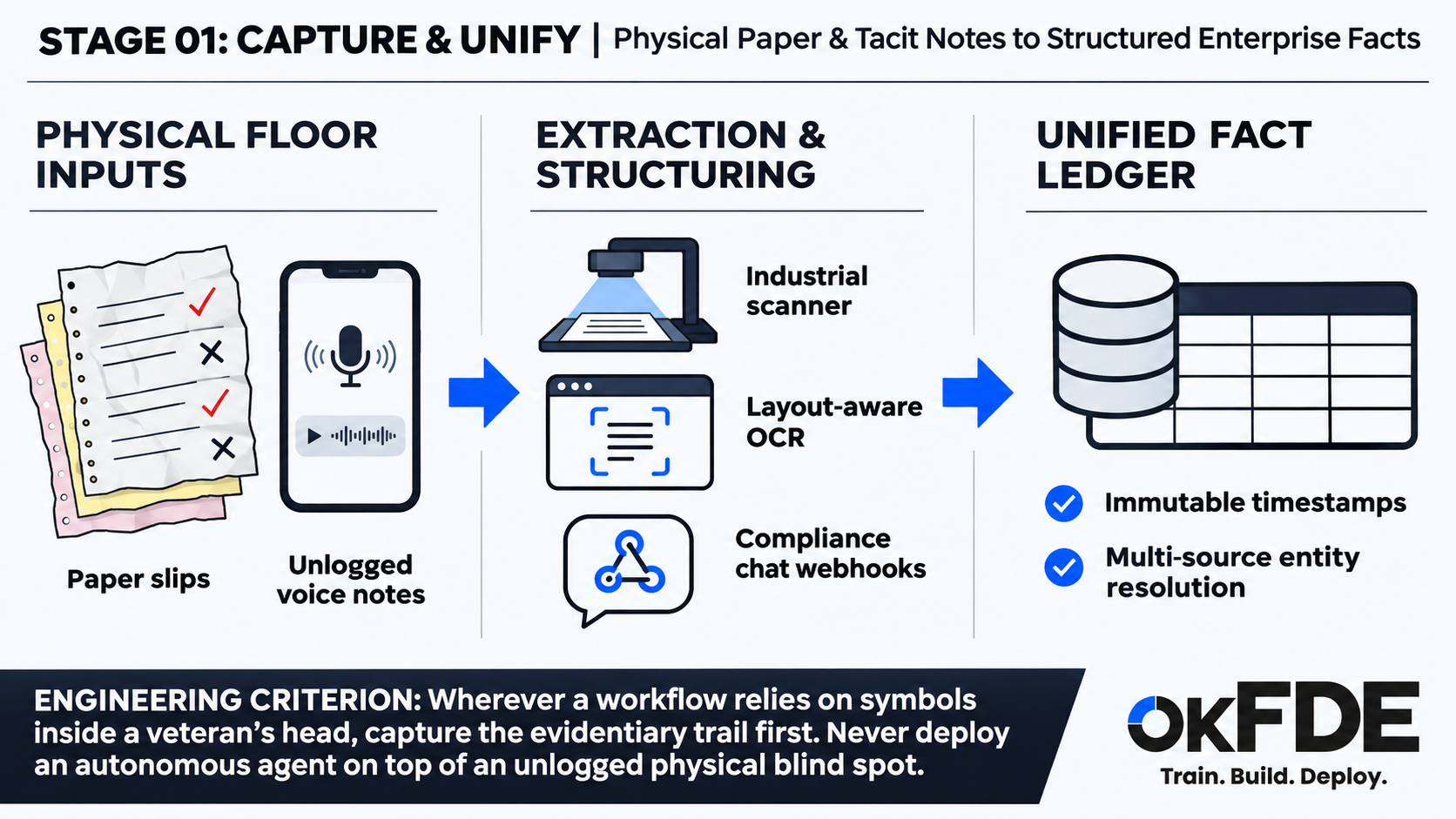
A red check means a shipment passed inspection. A black cross means damaged packaging. A circle with a question mark means the goods arrived, but the supplier still owes a quality certificate.
“Are these recorded in the ERP?” Leo asks.
“There aren’t fields for them,” Lou says. “Dave called and asked me to receive this shipment outside the schedule. I need a record of what happened when Finance asks about it at month-end.”
The paper holds facts that the software cannot see.
A receiving record may say that goods arrived without saying whether they passed inspection. A purchase order may contain the agreed quantity without recording the phone call that changed the delivery date. Connecting those systems will not recover information that never entered them.
Leo’s team spends two days documenting Lou’s twelve shorthand symbols.
They install an overhead scanner to capture the slips and convert the marks and notes into structured records. Procurement messages containing product and lot codes go into a staging table for pending receipt events.
The work gives the team a way to capture information that previously stayed on paper or in chat.
The record still needs its source. A structured field should lead back to the slip or message it came from. A timestamp shows when an event was recorded; it does not establish that the extracted value is correct.
At this stage, the team wants to answer practical questions: what arrived, what was inspected, what is missing, and where can someone check the evidence?
Lou can keep using his symbols while the team builds a better record around them. Replacing his entire working day is a larger project than installing a scanner.
02 / Define who can approve what
Once the records begin reaching the database, Alex wants to test supplier correspondence.
On Thursday, a test agent drafts a response to a pricing inquiry. The supplier’s email describes rising material costs and financial pressure.
The reply is sympathetic. It also proposes changing payment terms by sixty days and waiving a $20,000 late-delivery penalty.
Dave from Procurement reads the draft.
“Stop that before it goes out,” he says. “We’re already in a dispute with this supplier.”
The reply sounds reasonable in isolation. It does not follow the company’s position on the account, and the proposed payment change needs to specify whose obligation would move and in which direction.
Those details belong in the decision process before a message reaches the supplier.
The team documents the approval rules: who can change payment terms, who can waive penalties, and which disputes require escalation. Existing habits need review as well. A practice that has become familiar is not automatically an approved policy.
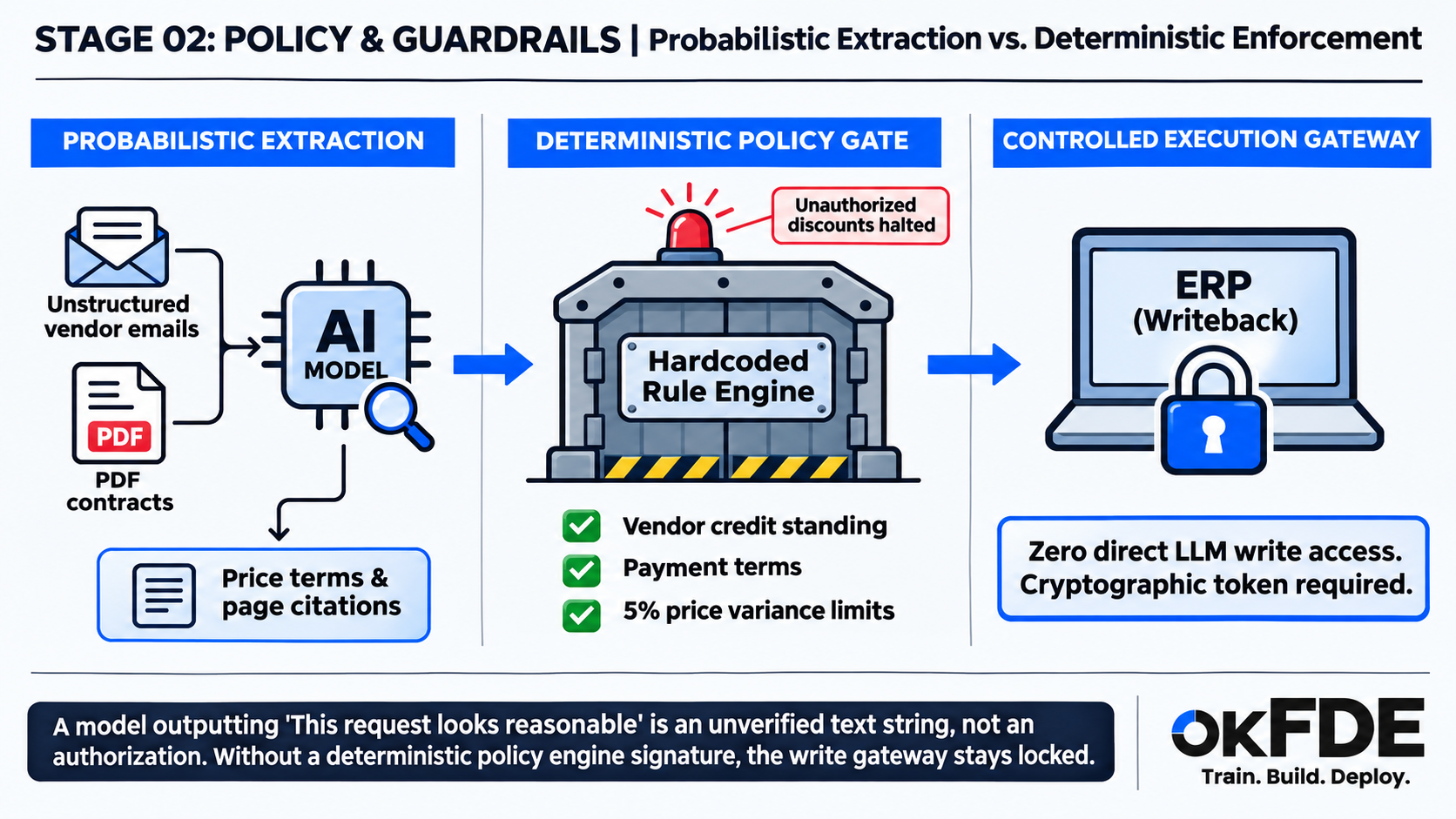
In this design, the model extracts information from contracts and messages, with references to the relevant passages. A separate policy service checks the proposed action against limits and approval requirements. An execution service controls whether it can be sent or applied.
For example, a regional director may approve a price variance of up to 5%. A higher variance requires VP approval. The execution service checks for that approval before sending the message.
The model has no direct permission to commit the change. That restriction has to hold across every execution route, including retries and manual tools.
Rules can contain mistakes, too. The team needs tests for incorrect limits, missing approvals, and changes to policy. Moving a decision into code makes it repeatable; someone still has to establish that the decision is right.
Dave’s review catches the problem while it is still a draft. It is a useful place to learn that the company needs an approval rule.
03 / Help people handle exceptions
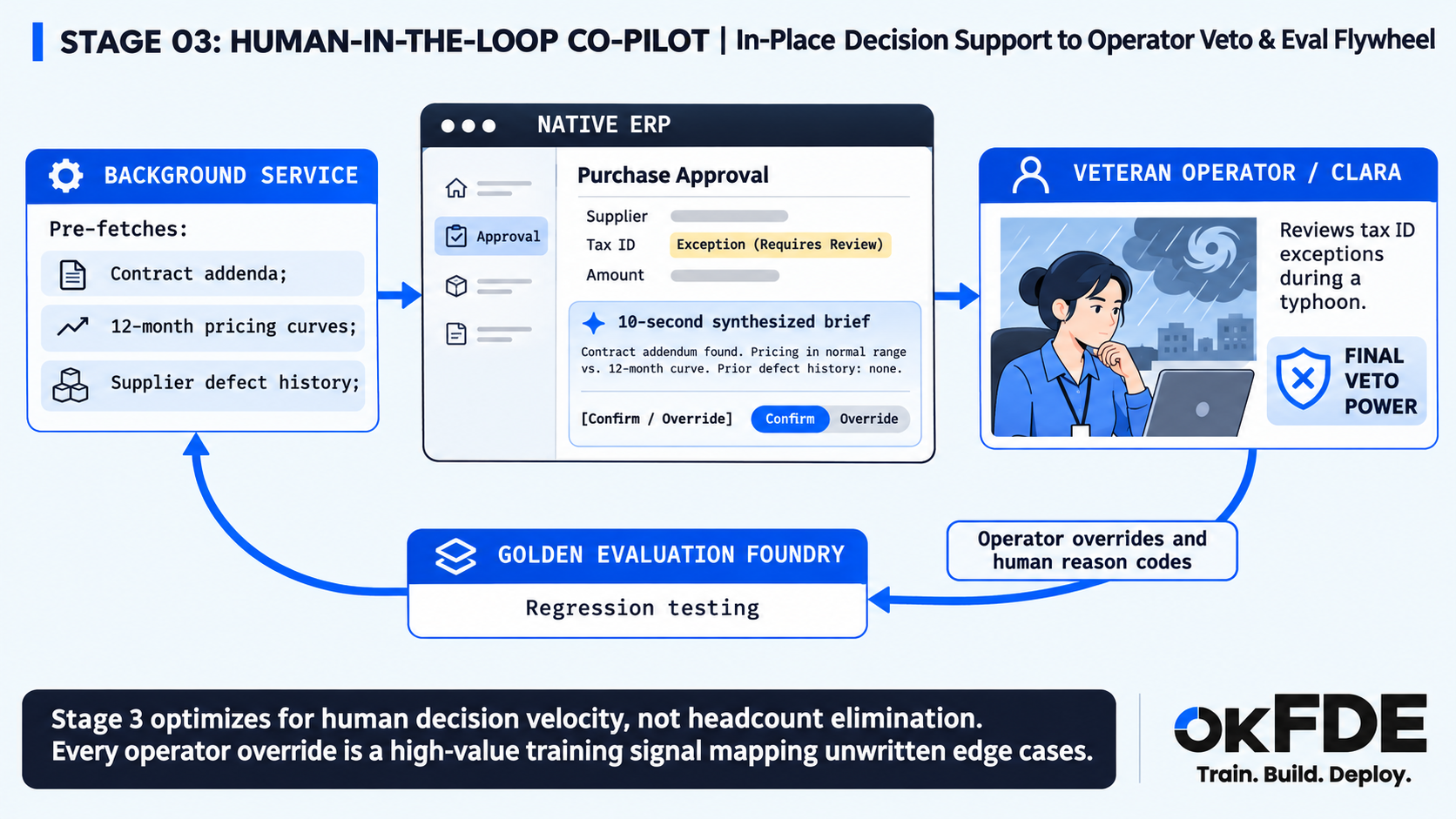
On Friday, a typhoon disrupts deliveries. Twenty trucks are delayed, the plant is running short of resin, and a backup supplier has changed its legal invoicing entity.
The tax ID on the invoice no longer matches the ERP record.
The automated check puts the receipt on hold.
Clara finds the supplier’s registration notice and calls Dave. They need to determine whether the goods can be received under an approved exception, who can authorize it, and what documentation must follow.
A mismatched tax ID cannot explain those circumstances on its own. It can identify the case for review.
The system helps by putting the relevant material inside Clara’s existing ERP screen: the registration notice, supplier history, credit information, and the documents required for a decision.
In the illustrative workflow, this reduces a search through folders and email attachments to a short review. The time needed still depends on the case. Ten seconds may be enough to recognize a familiar issue; it is not a sensible deadline for every financial or legal decision.
Clara can confirm a recommendation, change it within her authority, or send it to someone who can approve the exception. The interface records the decision and its reason.
That record is useful beyond the immediate order.
When operators repeatedly correct the same recommendation, the team has something specific to investigate. Perhaps a rule is wrong, a document is missing, or the interface hides information people need.
Human corrections also need review. An experienced operator can make a mistake or use a workaround that the company should not repeat.
Once checked, those cases can become evaluation examples. They help the team test whether a later change handles the exception correctly.
Clara spends less time finding documents. The engineering team gets a better account of where the workflow fails. Neither benefit requires pretending that every exception can be automated.
04 / Automate a defined set of actions
By the second month, the scanner processes hundreds of slips a day. The assisted workflow has accumulated more than a thousand reviewed exception cases in this fictional engagement.
Alex brings up overnight automation again.
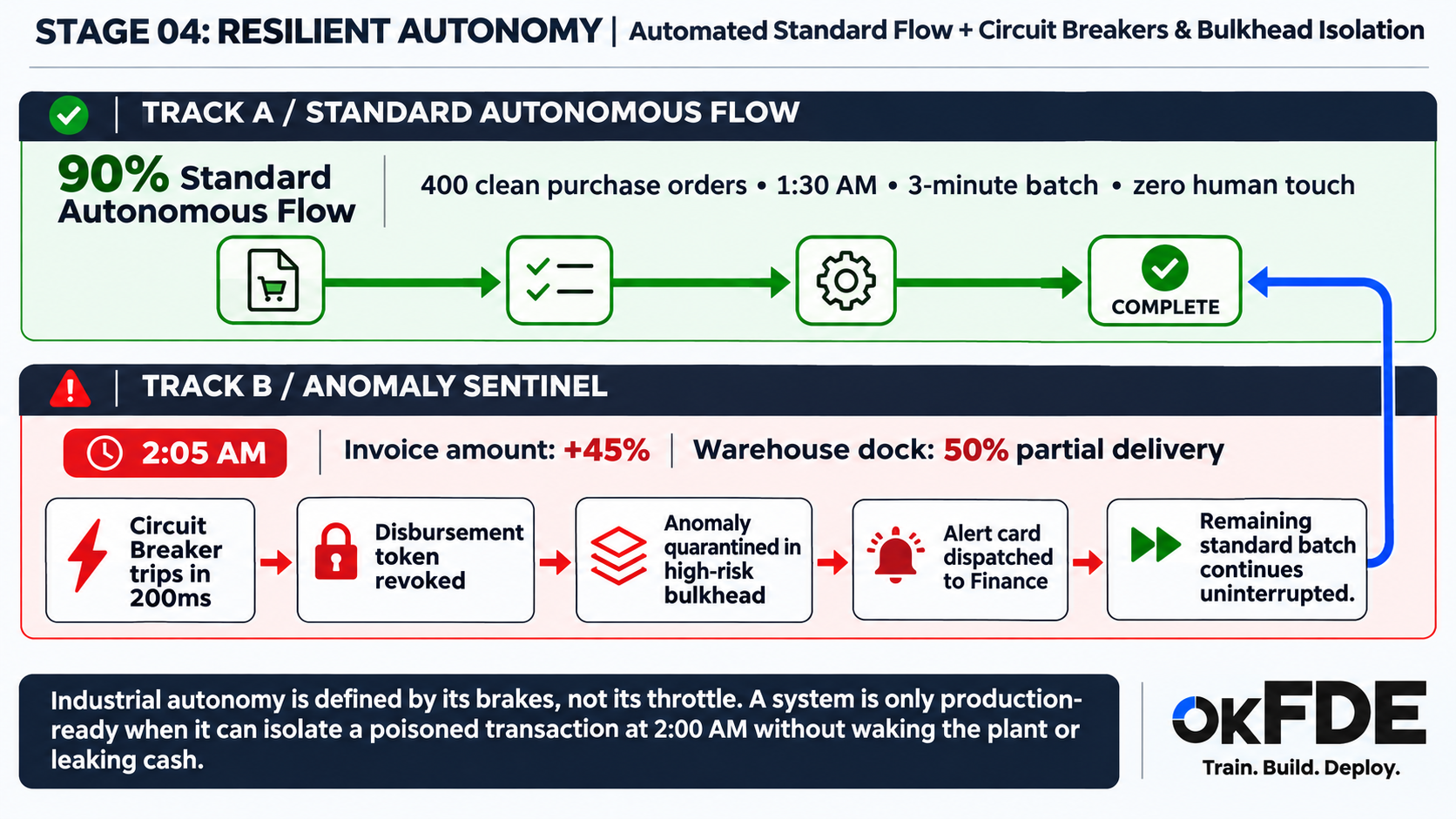
This time, the team can define a limited scope: routine orders with verified records, approved terms, matching entities, and the required authorization.
The scope also names what must stop for review.
In an illustrative overnight run, the scheduler processes four hundred standard purchase orders and two hundred routine warehouse dispatch slips. The expected run takes under three minutes.
Partway through, one invoice needs attention.
A long-standing packaging supplier has billed an amount 45% above its twelve-month average. The receiving record shows that only half the shipment arrived.
The workflow holds the invoice and blocks automatic payment for that supplier pending review. Other eligible orders continue.
In this example, the control takes 200 milliseconds to apply. That figure is a scenario setting, not a general promise about how quickly a payment can be stopped or recovered.
The distinction matters once an action has already taken effect. Blocking a new payment request does not reverse a completed transfer. The team needs a way to check the authoritative transaction state and resolve an uncertain result before trying again.
The review card gives Finance the facts:
Invoice amount deviates +45% from 12-month baseline; warehouse receipt shows 50% partial delivery. Suspected duplicate billing or split-order anomaly. Auto-disbursement halted.
The next morning, Finance finds that the supplier included the previous month’s balance twice.
The team turns the reviewed case into a regression test using synthetic data that preserves the failure pattern.
The overnight workflow depends on more than an anomaly threshold. It needs controls for repeated requests, partial failures, and uncertain outcomes. People must know which queue to review, who can resume processing, and how to return to manual work.
A circuit breaker can stop repeated calls to a failing service. Isolating a workload can contain a failure. Those controls support the workflow, but detecting an unusual invoice also requires business rules and reliable receiving data.
“Self-healing” would be a generous description of a system that still needs Finance to resolve the invoice. “It held the payment and left a clear record” is enough.
What the four steps mean for the next project
Back in the meeting room, Alex erases the large circle.
The revised plan fits in four lines:
1. Capture the warehouse and procurement records.
2. Define approval rules and enforce them at execution.
3. Give operators the evidence and controls to handle exceptions.
4. Automate eligible work, with tested stop and recovery procedures.
The steps help identify missing work. They do not set a universal maturity score or require every process to reach unattended operation.
Some workflows will remain assisted because their exceptions need judgment. Others may support a small amount of unattended processing long before the rest of the company does.
Clara looks into the room.
“Can you approve Lou’s rack and scanners?” she asks. “The hairdryer is still doing the data recovery.”
Alex opens the request on his phone and approves it.
After lunch, he and Leo head back to the warehouse to check the scanned receiving slips.
Next / Field Notes · 006
Two hundred scripts later, are we building a product?
The deployment works. The repository contains months of customer-specific fixes. How FDE teams decide what to reuse, what belongs in configuration, and what needs to stay with the customer.
ABOUT OKFDE
OKFDE is a research, engineering, and talent platform focused on Forward Deployed Engineering for enterprise AI. We turn lessons from real-world deployments into practical methods for delivering, operating, and improving AI systems.
Train. Build. Deploy.
For enterprise deployment inquiries, workshops, or field research: